 Continuation Drafter
Download
A macOS app you open by double-clicking it, and prebuilt binaries for the command line. Every link resolves to the current release, so it does not go stale between versions.
Download for macOS, Apple silicon and Intel
continuation-drafter-macos.dmg
Open it, drag Continuation Drafter to Applications, and double-click it. The drafting interface opens in your browser. macOS 11 or later, and one download runs on both Apple silicon and Intel.
Two ways to start
Keep it on this computer
For a computer with 16 GB of memory or more. Download the app and a model that runs
beside it, and nothing leaves the machine. On 16 GB that model is
gemma4:12b, and the memory it holds while it works is about 12 GB, flat. How long a
draft takes depends on the machine: the timings we publish are for remote models. This is
the path for anything unpublished or privileged.
See it working in minutes
With your own key for OpenRouter, OpenAI, Anthropic. Across 131 timed runs on remote models, the median draft took 78 seconds. The provider receives the specification, so use it for published material, such as the published specification the demo drafts from.
Three steps to your first draft
This is the command you are working toward. It needs no files of your own, because the specification is built into the binary. It does need a model, which is step 2.
./continuation-drafter draft --demoThree steps stand between the download and that line. On your
own work the command is
draft --document your-application.txt, which reads a whole application and
works out the specification and the claims itself. That is the real workflow; this page
puts the run that needs no files first, because you can do it now.
Open it
The app: double-click the downloaded .dmg, drag
Continuation Drafter to your Applications folder, and double-click it there. macOS
asks once whether you are sure you want to open something downloaded from the
internet; the button is Open. Nothing else is needed: no Terminal,
no permissions to change.
It has no Dock icon on purpose, because it runs no window of its own: the interface is the browser tab it opens. To stop it, press Stop in that tab.
Or, from the command line
chmod +x continuation-drafter-darwin-arm64 && \
  mv continuation-drafter-darwin-arm64 continuation-drafter
That is two things: make it executable, and give it a shorter name to type.
Both the app and the raw binaries are signed with a Developer ID
certificate and notarized by Apple, so nothing has to be done to either file after
downloading it and there is no quarantine flag to clear. If you find an older page
telling you to run xattr, it predates v0.1.4.
Notarization means Apple scanned this developer's build; it does not tell you the file in front of you is that build. The check that establishes that is its SHA-256, listed with the release. Linux and Windows need neither step.
The Windows binary is signed too, as of v0.2.3, with a certificate issued to Geeks in the Woods, which is the name Windows shows as the verified publisher. Releases before v0.2.3 were unsigned, which is why Defender blocked them. Windows still warns on a fresh release, saying the file isn't commonly downloaded and preselecting Delete: that is scored separately from the signature and clears as people take each build. Read the publisher line rather than the warning text, because a build from this project names Geeks in the Woods, and the SHA-256 above is what establishes the file is that build.
Choose where the model runs
Two options, and they trade off against each other rather than one being better:
- A model on your own machine. Install Ollama and download the model once, 12 to 30 GB depending on your memory. Slower to start. Your specification is not transmitted anywhere.
- Your own provider key. Paste a key, no download, running in minutes. Your specification reaches that provider, and they meter what you use.
For a real matter that is a decision you make per matter, and the key page is where that belongs. For the run in step 3 it is not a decision at all: that run uses a published specification committed to this project, so there is nothing of yours to protect and a provider key is the quickest way to see the tool work.
Draft something, with no file of your own
./continuation-drafter draft --demoThis drafts against a published specification built into the binary, so it needs no files of your own and never counts against any allowance. It is the same walkthrough the course teaches, and a full run is printed unedited here.
Name the model on the command itself if you have not saved one:
DRAFT_MODEL=<model> ./continuation-drafter draft --demo
If it does not run, ./continuation-drafter models
reports what the tool resolved and what your machine can host.
On your own document, in the app
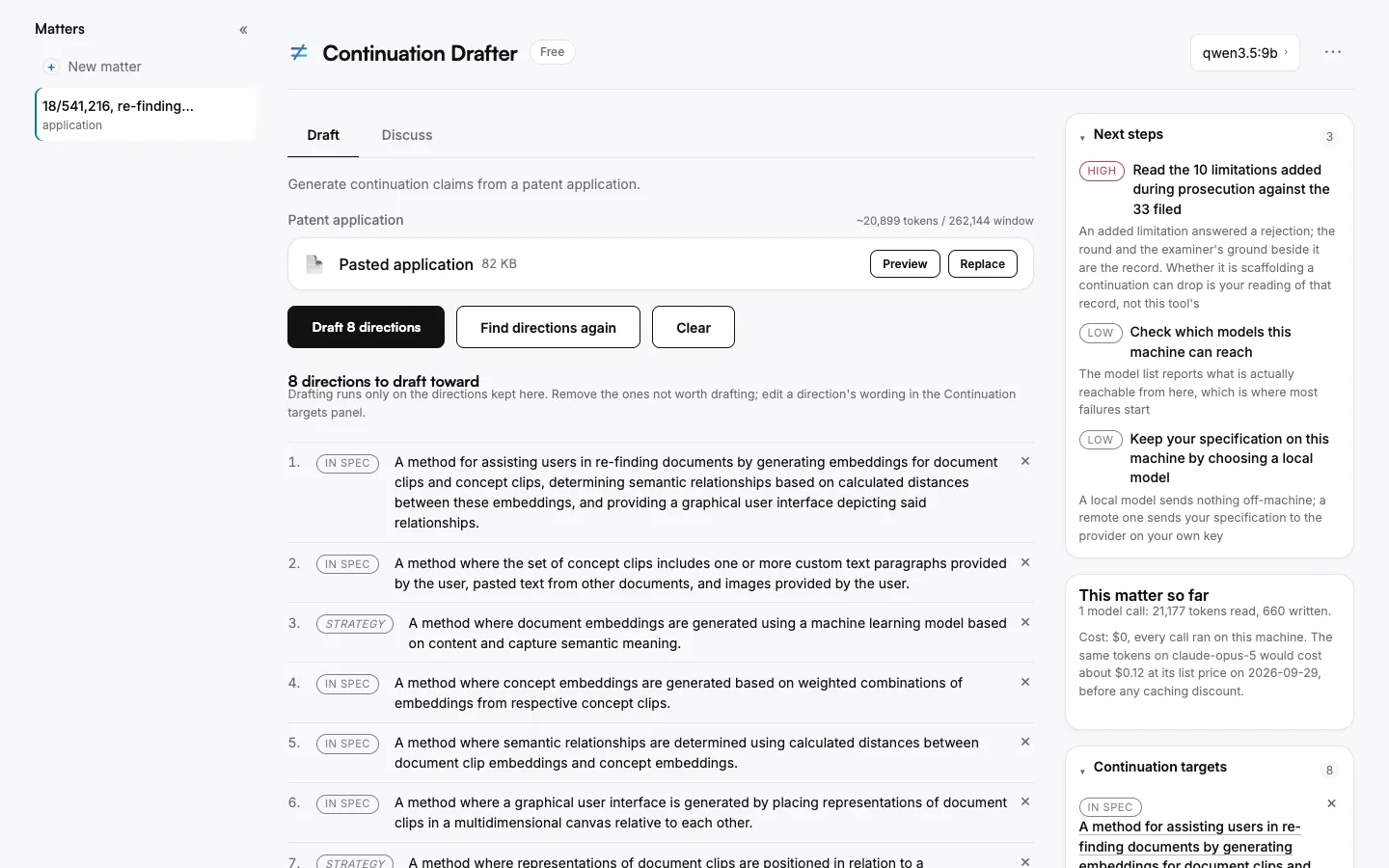
Load an application and press the first button: the app proposes directions for a continuation and drafts nothing until you keep the ones worth drafting. The whole page after drafting.
What is checked, and how you can check it
Every claim here is one you can confirm yourself. None of it asks you to take our word.
Reviewing it for a firm? The IT and security page lists every network connection it makes, where it keeps its files and how each download is signed.
Your specification stays on your machine
On the local path, inference runs on your own hardware and the specification is not transmitted anywhere. Point the tool at a cloud provider instead and it names the company that will receive it, before it sends anything. That is a decision you make per matter, and it is stated at the moment you make it.
Signed, and you can see by whom
Windows shows Geeks in the Woods as the verified publisher; the macOS app is signed with a Developer ID and notarized by Apple, which scans every build. To confirm it yourself on Windows: right-click the file, then Properties, then Digital Signatures.
Every file publishes its fingerprint and its contents
A SHA-256 for each download is published with the release in
checksums.txt. It is what establishes that the file you have is the
file that was built, which a signature alone does not tell you.
Since v0.2.4 each binary also ships a bill of materials listing every library inside it, with versions, down to the version of the Go runtime it was built with. That is what lets anyone answer whether a particular build contains a library named in a future advisory, without rebuilding it.
Since v0.4.0 the checksums file is itself signed, and the app uses that signature to update itself: press Check for updates in Settings and a newer version installs only after the signature, the checksum and, on a Mac, Apple's signature all verify. It checks only when you ask.
Known vulnerabilities stop a release
Before any release is published, the code and every library in it are checked against published security advisories. One that is reachable from this code fails the release rather than shipping in it.
The tool is a drafting aid for licensed practitioners and its output is never filing-ready. These are statements about the software, not about what it produces.
Command-line binaries
The same program without the wrapper, for a terminal, a script or CI. Linux and Windows are here too.
- macOS, Apple silicon
continuation-drafter-darwin-arm64 - macOS, Intel
continuation-drafter-darwin-amd64 - Linux, x86-64
continuation-drafter-linux-amd64 - Linux, arm64
continuation-drafter-linux-arm64 - Windows, x86-64
continuation-drafter-windows-amd64.exe
Not sure which Mac you have? Apple menu, then About This Mac. A chip named Apple M1, M2, M3 or later means Apple silicon; anything named Intel means Intel.
Or work in a browser instead
The same binary serves a local interface. One command, and drafting, critique and scoring happen in a browser window rather than at a prompt.
./continuation-drafter serveIt binds to 127.0.0.1, which is your own machine and not
a network address anyone else can reach, and opens your browser. The models it offers
are the ones already installed on your machine, so there is nothing to type and nothing
to remember. Everything the command line does is there: drafting, per-claim critique,
scoring and the multi-model panel.
The steps above still apply. This is the same download and the same model choice; only the last step differs.
Before you run it on a real matter
Try it on a published patent first. The output is drafting input for you to edit, it is never filing-ready, and seeing how much editing a draft needs on material you already know well is the fastest way to judge whether it earns a place in your workflow.
One question, if you have a minute
We do not know how many practitioners will run a model on their own hardware versus pointing the tool at their own provider key, and that assumption sits underneath most of how this is built. If you downloaded it, telling us which you chose, or that you chose neither and why, is genuinely useful.
[email protected]. It goes to a person. There is no list to join and nothing follows.